While building JupiterGoals, I wanted to leverage the power of AI while keeping costs at an absolute minimum ($0 if possible) by relying on a smart mix of cloud and local resources.
This post breaks down the architecture and the specific engineering decisions I made to achieve that.
I’ve decided to use Google Cloud Platform (GCP) as they currently offer the most generous credits for startups. While the goal is to keep costs at a minimum without relying on credits, having them provides a safety net to scale up and utilize higher GPU-compute instances for verification when needed.
High-Level Architecture
Here is an overview of the system:

1. The Serverless Java Foundation
First, the core service needs to be serverless. As I am building this product on top of my normal work, I’d rather spend time developing features than patching servers. Serverless provides the freedom to manage scale and updates automatically.
The challenge with Java in a serverless context is the “Cold Start.” Java by default starts relatively slowly (3-5 seconds boot time), and frameworks with heavy reflection can push this even higher. Additionally, the JVM relies on the JIT (Just-In-Time) compiler to optimize performance over time—a benefit you lose in ephemeral serverless functions that die after a few invocations.
The Solution: GraalVM Native Image To address this, I used a GraalVM native image. This allows us to perform Ahead-of-Time (AOT) compilation, converting the Java application into a standalone native executable.
-
Memory Footprint: from 500mb to 100mb

-
Startup Time: Reduced from 3 seconds to 100 milliseconds.

-
Portability: Runs without a JVM installation.
2. Event-Driven & Resilient (Spring Modulith)
On the application side, I employed an Event-Driven Architecture combined with Domain-Driven Design (DDD) principles. I utilized Spring Modulith to structure the application modules.
This architecture is crucial for spot instances. If a process gets terminated abruptly, the transaction is rolled back, and the event remains in the queue to be retried when the system comes back online.
3. The Hybrid GPU Strategy
Inference is the most expensive part of an AI SaaS. To mitigate this, I designed a hybrid approach using a Redis Queue. This decouples the inference work from the core service and allows me to utilize heterogeneous compute resources:
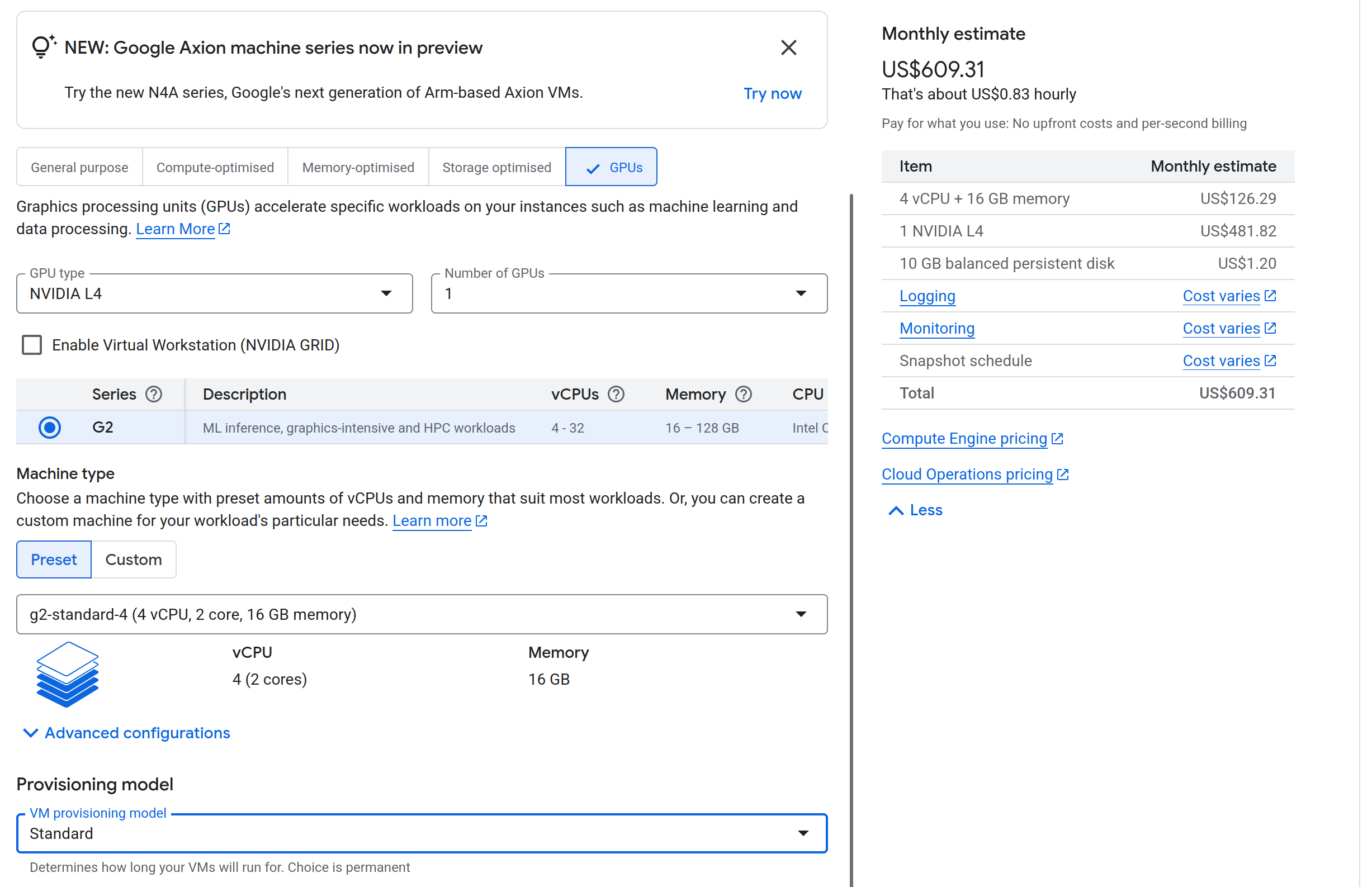
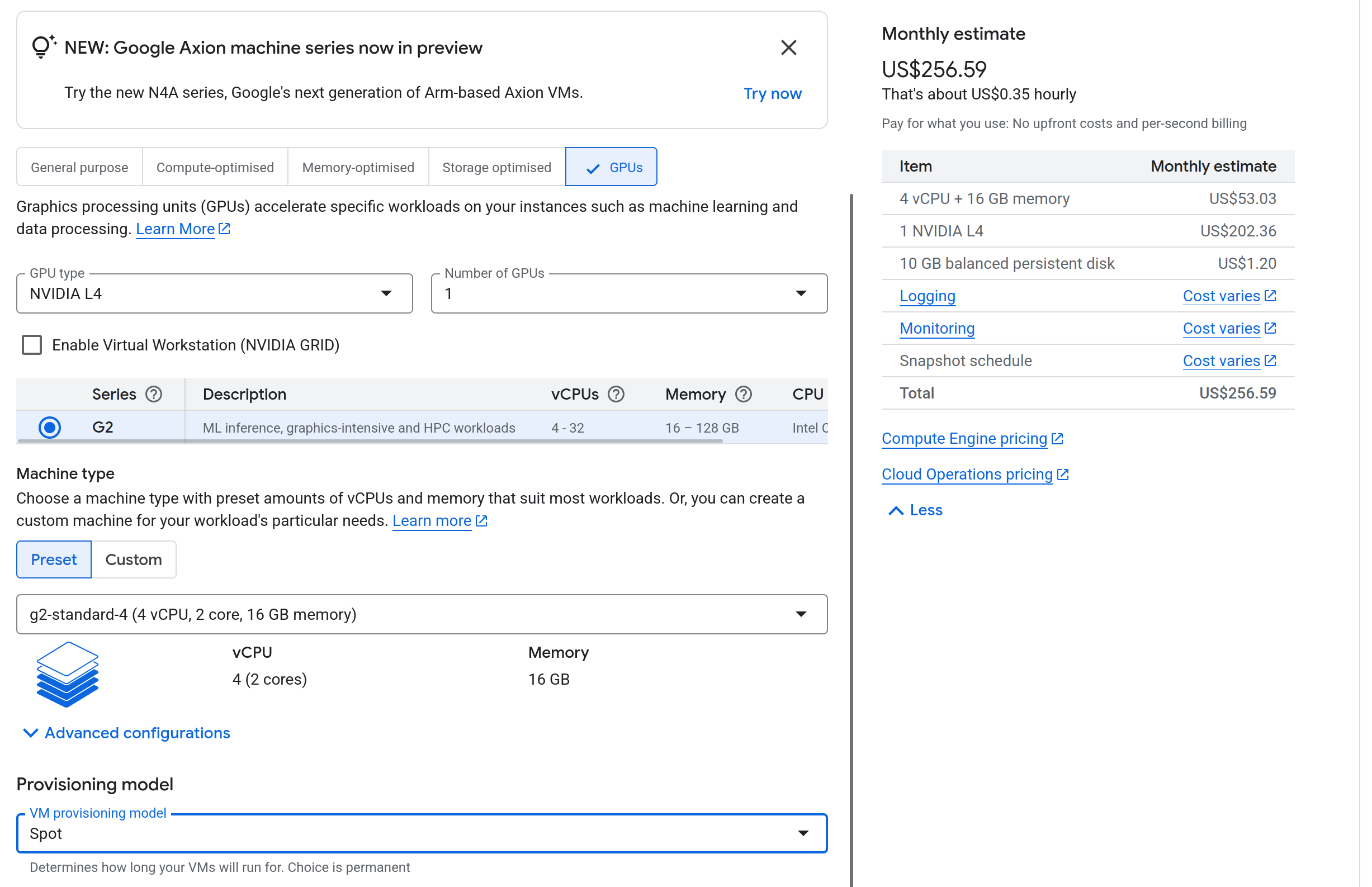
- Cloud Spot Instances: I use Google Cloud L4 instances. The standard cost is around $600/month, but Spot instances are about 70% cheaper (around $250/month).
- Risk: Spot instances can be Preempted (terminated) at any time.
- Mitigation: The event-driven design ensures no data loss during preemption.
- Local “Bring Your Own” Compute: I have a local machine with an RTX 4000 series GPU (roughly equivalent to an L40s around $1500/month).
- Implementation: I used a Cloudflare Tunnel to securely connect my local machine to the Redis instance.
- Concurrency: Redis is single-threaded, so there is no contention locking issues.
- Reliability: I utilized the Reliable Queue Pattern with
LMOVE(orBLMOVE). This ensures that if a worker (local or cloud) picks up a job and crashes, the job is not lost—it is moved to a processing queue and can be recovered.
Standard L4 monthly cost
Spot L4 monthly cost
4. Database Connection Management
In a serverless environment, connection exhaustion is a silent killer.
- The Math: If 50 serverless instances spin up and each opens a default HikariCP pool of 10 connections, that’s 500 active connections. Most managed DB tiers (and especially free ones) will reject this.
- The Solution:
- NeonDB: I used NeonDB which supports “Pooled connections” via a built-in PgBouncer implementation, efficiently multiplexing connections.
- Upstash (Redis): For Redis, I utilize the REST API where possible to avoid persistent TCP connection overhead, or configure strict pool limits.
5. High-Performance Inference: vLLM vs. Ollama
For local development, Ollama is fantastic. However, for a production SaaS, it bottlenecks quickly.
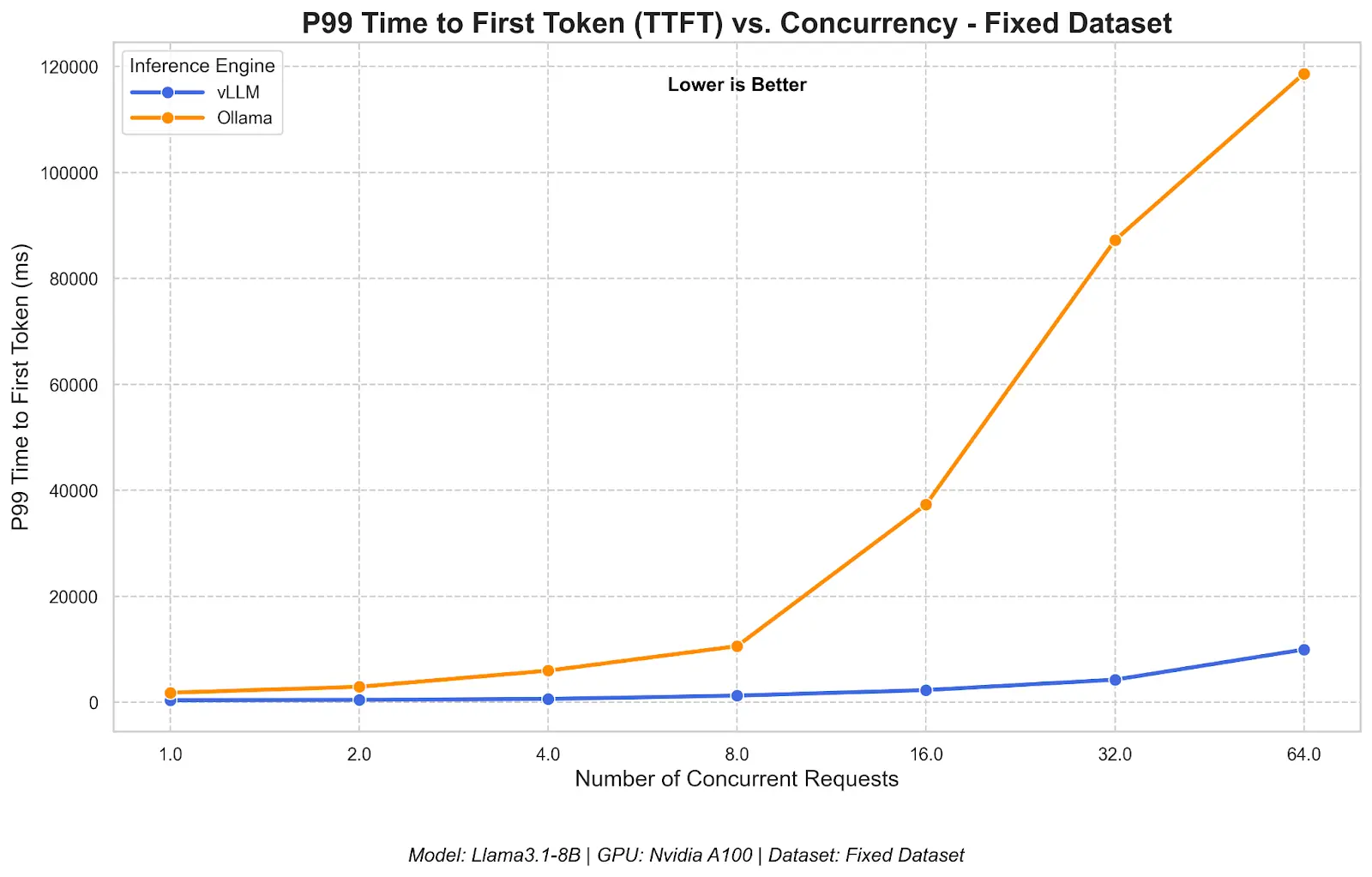 Source: Red Hat Developers. See the full benchmark comparison.
I found the throughput with Ollama too slow for concurrent user requests. I switched to vLLM (Virtual Large Language Model).
- Throughput: Significantly higher due to PagedAttention.
- Concurrency: Scales better with concurrent inputs.
- Efficiency: Java is often critiqued, but it is highly efficient. The 1 Billion Row Challenge demonstrated Java processing massive datasets in <2 seconds. Combined with vLLM for the AI layer, the stack is incredibly performant.
Challenges I Faced
- GraalVM Metadata Hell: The biggest hurdle was runtime errors due to missing classes. Libraries like Flyway (for DB migration) rely heavily on reflection. I had to manually annotate hints and use a native agent to hint the compiler about these dynamic classes.
- CI/CD Resource Exhaustion: Compiling a Native Image is CPU and RAM intensive. While it can build in CI with Github the build is slow so I just build it locally for now as my dev machine is much faster and I’m a solo dev at this point.
- Spot Instance Availability: Provisioning lower compute instances in Google Cloud requires quota increases. T4 instances were unavailable due to high demand, forcing an upgrade to L4. While L4 has 24GB VRAM (great for inference), the network bandwidth on is still not as performant. (The token response is slower than on my local machine)
- vLLM Configuration: vLLM is not “plug and play” like Ollama. It requires careful tuning of
gpu_memory_utilizationto allow inferencing andmax_model_lento not get OOM Without this, vLLM aggressively reserves too much VRAM making starting the model impossible. I also need to make my vllm startup to be environment aware so I can optimze the configuration for both local and cloud versions.
Key Learnings
- Serverless Connection Pools: Always configure your connection pool size explicitly for serverless. Default settings assume a long-running server; a pool size of 5-10 is often sufficient and prevents downstream throttling.
- Production Inference requires vLLM: Ollama is an abstraction layer great for dev, but vLLM gives you the raw control over memory paging and batching required for a multi-tenant service.
- Native Image is worth the pain: Despite the configuration headaches, the sub-100ms startup time makes Java feel like Go or Rust in a serverless environment.
- Reliable Queues over Pub/Sub: For expensive GPU tasks, simple Pub/Sub isn’t enough. You need
LMOVE(Atomic move) patterns to ensure that if a GPU node (especially a spot instance) dies mid-inference, the job is atomically returned to the queue for another worker.
Get Early Access to JupiterGoals
Want to follow the development journey and get early access? Sign up below to become a “Founding Member” (one of the very first supporters who joins before the product is publicly launched).